

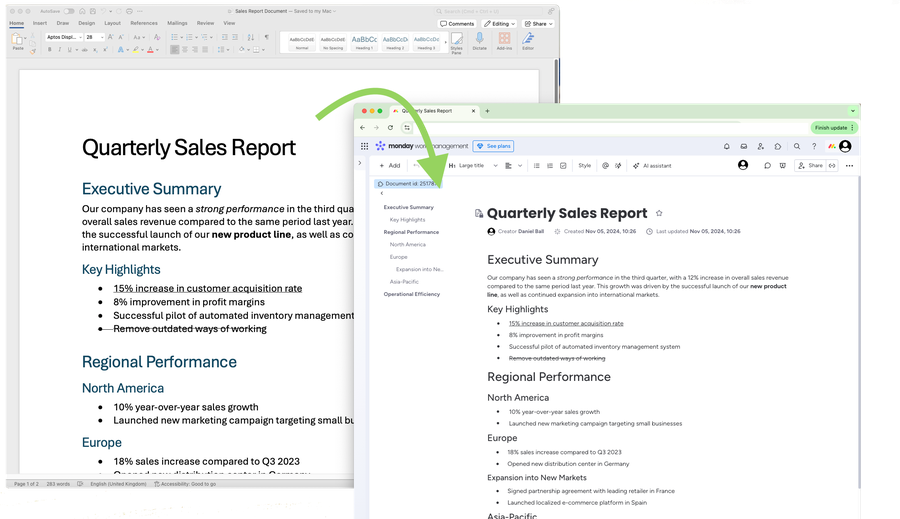

Word Import for monday.com
Turn your Word files into monday docs, with their headings, lists, tables, links and formatting.
See the listing on the monday.com marketplace
Ways to import
- Into a new doc. Open Word Import under Workspace apps in your workspace and choose a Word file. You get a new doc, named after the file or whatever you like.
- Many files at once. Choose several Word files, or a whole folder, and each one becomes a doc, together in a new folder.
- Into the doc you're in. In any doc, click + and choose Word Import. Put the file where you clicked, at the end or in place of what's there.
- From your boards. Word files in a board's Files column become a doc on each item, in the board's Doc column. Pick items, a whole group or a single item from its menu.
monday sends you a notification when your import is done, and the Word import jobs page lists every import, so you can find the doc, import a newer version of the file or tidy up.
What's imported
- Headings, titles, quotes and code
- Bold, italic, underline, strikethrough and text colours
- Bulleted, numbered and checklists, with their indentation
- Tables, including merged cells and header rows
- Links
- Footnotes and endnotes, text in text boxes, equations and tracked changes as they'll read once accepted
Pictures aren't imported yet.